
Most business owners we talk to are using ChatGPT or Claude for AI. Good tools. But almost none of them have heard of NotebookLM, and it does something neither of those tools can do: it turns your documents into podcasts, slide decks, infographics, and briefing docs. For free.
Google launched NotebookLM quietly in 2023, and it's been adding features at a pace that would make most startups jealous. Audio Overviews (AI-generated podcast episodes from your documents) went viral. Slide Decks, Video Overviews, Mind Maps, and Deep Research followed. It now runs on Gemini 3 and supports 80+ languages.
Here's the honest breakdown: what it does, how to use it, and the six workflows that save our clients real time every week.
What NotebookLM Actually Is
NotebookLM (the LM stands for Language Model) is Google's AI-powered research assistant. The core idea is source-grounded AI: you upload your documents, and the AI analyzes and generates outputs based exclusively on those materials.
The workflow is simple:
- Create a notebook
- Upload your sources (PDFs, Google Docs, websites, YouTube videos, audio files, slides, spreadsheets)
- Ask questions, generate summaries, create Audio Overviews, Slide Decks, or any of the other output types
- Every answer includes citations back to specific passages in your sources
The key difference from ChatGPT or Claude: NotebookLM won't make things up. If the information isn't in your uploaded sources, it tells you it can't find it. No hallucinations from training data. No confident-sounding wrong answers. Just your documents, analyzed by Google's best AI model.
You can access it at notebooklm.google on the web, or through the Android and iOS apps (launched May 2025).
The Features That Matter for Business
Audio Overviews
This is the feature that put NotebookLM on the map. Upload any document and NotebookLM generates a podcast-style discussion between two AI hosts who break down the content in a conversational format.
It sounds like a real podcast. Two hosts discuss your material, explain complex concepts, highlight key points, and even debate different angles. You can choose between formats: Deep Dive (comprehensive), Brief (quick summary), Critique (critical analysis), or Debate (opposing viewpoints). Available in 80+ languages.
The business use case is obvious: take a 30-page report your team needs to read and turn it into a 10-minute podcast they can listen to during their commute. We've seen clients use this for quarterly reports, competitor analyses, and even internal policy updates that nobody was reading before.
Slide Decks
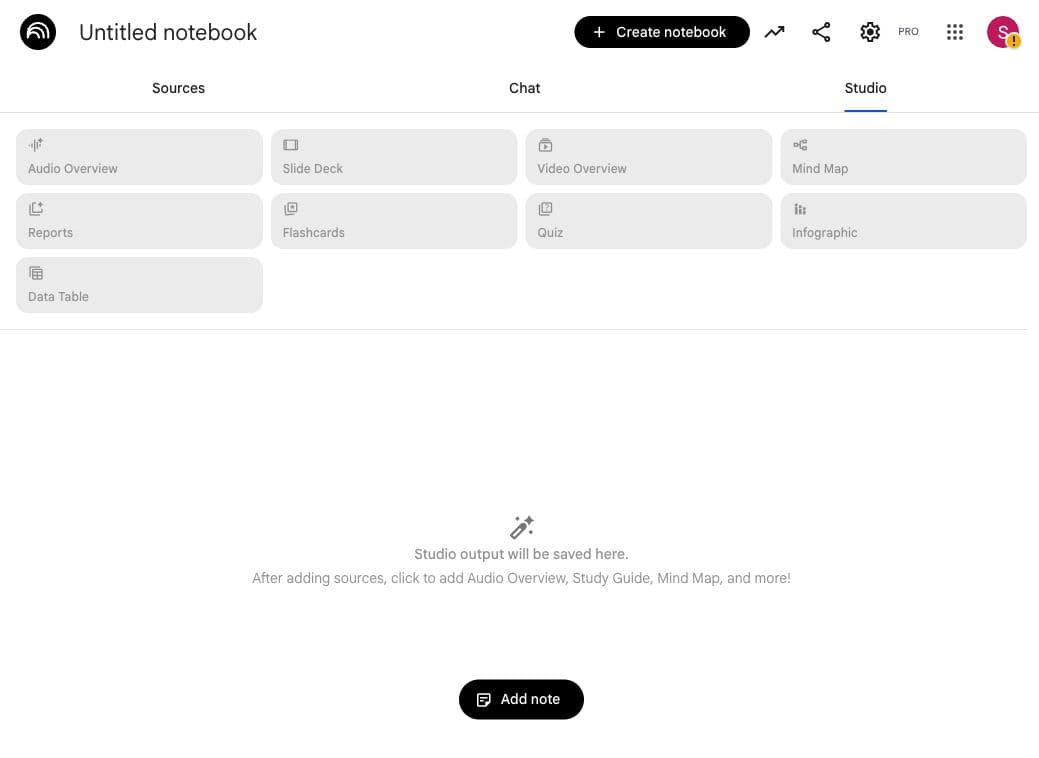
Upload your data, select “Slide Deck” from the Studio panel, and NotebookLM generates a complete presentation. You can choose between “Detailed Deck” (with full content on each slide) or “Presenter Slides” (with speaker notes underneath). You can target the audience level: beginners, experts, C-suite, or operational teams.
Briefing Docs and Reports
Upload multiple sources and get a concise summary that highlights key themes, findings, and actionable insights. Useful for board prep, quarterly reviews, or synthesizing research from multiple articles into a single document.
Deep Research
Added in November 2025, Deep Research goes beyond your uploaded sources. It browses hundreds of websites, creates a research plan, and generates an organized report with citations. You can then add any of those discovered sources directly to your notebook for further analysis.
Other Outputs
NotebookLM also generates Video Overviews (narrated slide-style videos), Mind Maps, Infographics, Data Tables (exportable to Google Sheets), Flashcards, and Quizzes. The Studio panel gives you one-click access to all of these.
6 Business Workflows You Can Start Today
These are the workflows we recommend to clients. Each one takes less than 15 minutes to set up.
1. Meeting Notes to Action Items
Upload your meeting transcript (from Otter, Fireflies, or a Google Meet recording). Ask NotebookLM: “Create a table of action items with owner, deadline, and priority.” Export the Data Table to Google Sheets. Done.
2. Competitor Analysis
Add competitor websites, their recent blog posts, press releases, and product pages as sources. Ask: “What are the key differences between these competitors? Where are the gaps?” Generate a Briefing Doc or Slide Deck for your next strategy meeting.
3. Training Materials
Upload your SOPs, product documentation, or technical specs. Generate a Study Guide for new hires, an Audio Overview they can listen to on day one, and Flashcards for retention. One set of source documents, three training formats.
4. Content Repurposing
As we covered in our 1-person marketing team guide, repurposing content across formats is how lean teams stay visible. Upload your blog posts and NotebookLM generates Audio Overviews (instant podcast episodes), Slide Decks (for LinkedIn or presentations), and Infographics (for social media).
5. Client Briefings
Before a client call, upload their recent emails, project docs, and any relevant research. Ask NotebookLM for a 2-page briefing. You walk into the meeting with full context without spending an hour re-reading everything.
6. Research Synthesis
Evaluating a new tool or vendor? Upload product pages, reviews, comparison articles, and pricing docs. Use Deep Research to find additional sources. Ask NotebookLM to synthesize everything into a recommendation with pros, cons, and a decision framework.
Free vs. Paid: What You Actually Need
NotebookLM has a genuinely useful free tier. Here's what you get:
- Free: 100 notebooks, 50 sources per notebook (up to 500,000 words each), 50 chat queries per day, 3 Audio Overviews per day. This is enough for most small businesses.
- Plus ($19.99/month via Google One AI Premium): 500 notebooks, 300 sources per notebook, 20 Audio Overviews per day, custom response styles, early access to new features. Worth it if you're using it daily across multiple projects.
- Ultra ($249.99/month): 600 sources per notebook, 200 Audio/Video Overviews per day, 5,000 chat queries, watermark removal. Enterprise-level usage only.
Our recommendation: start with the free tier. If you find yourself hitting the 3 Audio Overviews per day limit or running out of source slots, upgrade to Plus. Most businesses won't need Ultra.
For teams, NotebookLM is available through Google Workspace Business and Enterprise plans with enterprise-grade security and data governance.
NotebookLM vs. ChatGPT vs. Claude
We get this question constantly. Here's how we think about it:
- NotebookLM is best when you need outputs from your specific documents. Audio Overviews, Slide Decks, Infographics. It won't hallucinate because it only works from your sources. The tradeoff: it can't reason beyond what's in those documents (unless you use Deep Research).
- ChatGPT is best for general-purpose tasks: drafting emails, brainstorming, writing code, analyzing data. It uses your uploaded files as context but also draws from its training data. More flexible, but more likely to make things up.
- Claude is best for nuanced analysis, long-form writing, and complex reasoning. As we covered in our switching guide, Claude excels at following detailed instructions and maintaining voice consistency. Projects give you a way to ground it in your documents, similar to NotebookLM.
The smart play is using all three. NotebookLM for document-to-content workflows (podcast from a report, slides from research). Claude for writing and strategy. ChatGPT for quick tasks and general questions. Each tool has a lane. The businesses getting the most from AI tools right now are using the right tool for each job instead of forcing one tool to do everything.
Tips to Get More Out of It
- Organize by project, not by topic. Create separate notebooks for each client, project, or initiative. Notebooks can't cross-reference each other, so keeping them focused gives you better results.
- Be specific in your questions. “Summarize this” gives you a generic summary. “What are the three biggest risks mentioned in these documents and what mitigation strategies are suggested?” gives you something useful.
- Customize Audio Overviews. Add a focus prompt before generating: “Focus on the financial implications” or “Explain this for a non-technical audience.” The output quality jumps dramatically.
- Use suggested questions. After uploading sources, NotebookLM generates questions you might not have thought to ask. These often surface insights you'd miss on a manual read.
- Chain outputs. Start with a Mind Map to see the overall structure, then generate a Briefing Doc for details, then create an Audio Overview for your commute. Same sources, three different formats, three different use cases.
- Use Deep Research to find what you don't know. Start with a question, let Deep Research browse the web, then add the best sources it finds to your notebook. Now you have source-grounded answers on material you didn't even know existed.
NotebookLM won't replace your AI assistant for writing emails or building strategy. But for turning a stack of documents into usable content, it's the best free tool available right now. If you haven't tried it yet, go to notebooklm.google, upload something you need to process this week, and see what comes out.
If you want help figuring out which AI tools fit your business and how to build workflows around them, let's talk.

Elevated AI Consulting
Sam Irizarry is the founder of Elevated AI Consulting, helping businesses grow through strategic marketing and AI-powered solutions. With 12+ years of experience, Sam specializes in local SEO, web design, AI integration, and marketing strategy.
Learn more about us →